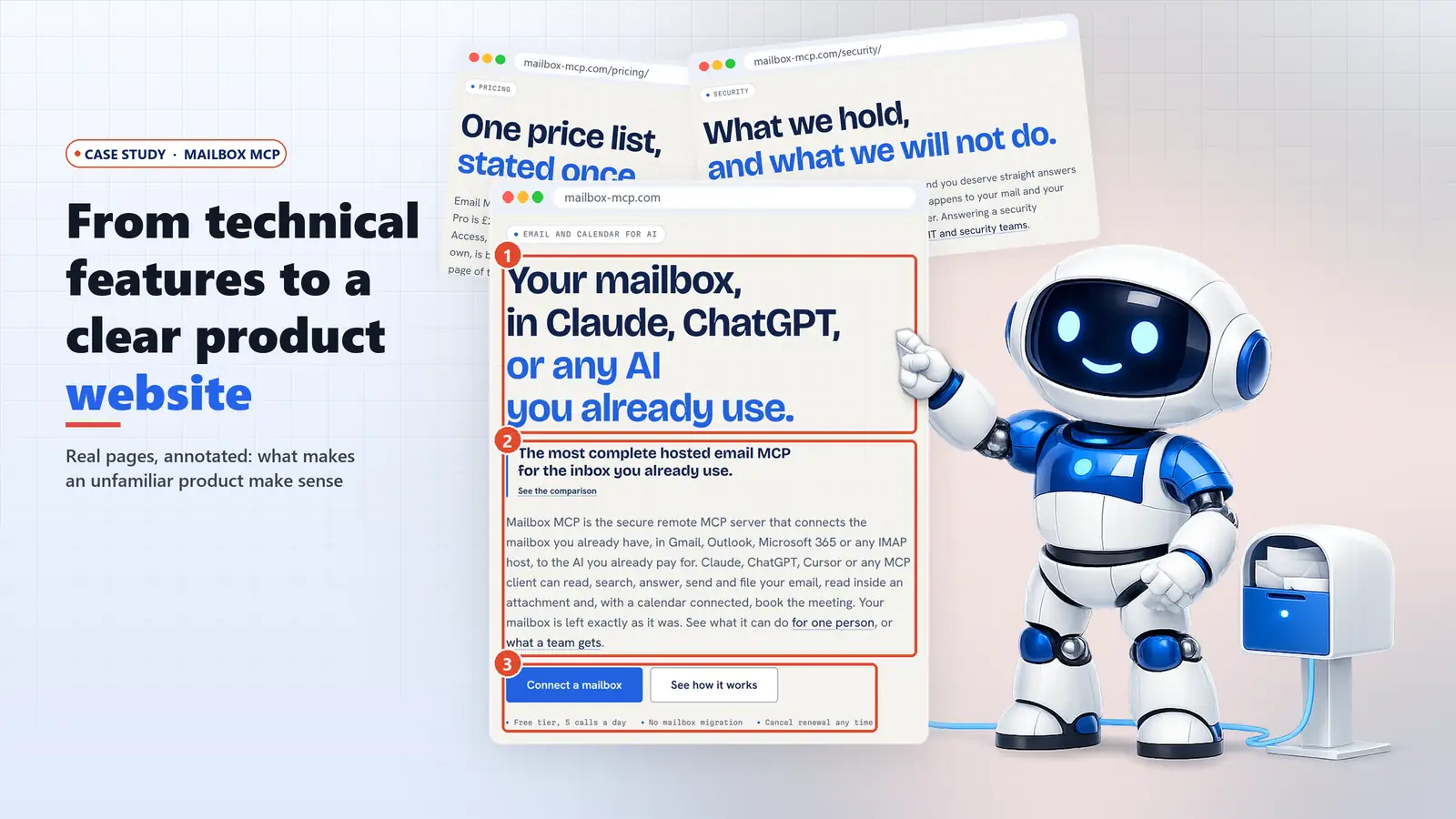
If you have ever had to explain a technical product to someone who has never heard of its category, you know the problem: every honest description starts with a word they don't know. Mailbox MCP has that problem in its name. It's a hosted MCP server that connects an ordinary Gmail, Outlook or IMAP mailbox to Claude, ChatGPT and other AI assistants, and most people who need it have never typed the letters "MCP" in their lives. This is a first-hand look at how its website deals with that, page by page, using annotated captures of the live site taken on 26 October 2026.
Who built what, and why that matters here
Mailbox MCP and Press Forge are both brands of BSolve IT Limited, and I founded the product. Its website was built in-house at BSolve IT, to the same build standards we use for client sites, but it was not a Press Forge commission and there is no client in this story (our client work is in our case studies). That makes this a case study of our own decisions, with the obvious caveat that we are not neutral about them. Where I'm describing what a page does, the captures are the evidence. Where I'm giving my reading of why it works, I'll say so.
Mailbox MCP in Numbers, and What Those Numbers Prove
A case study about a website ought to say whether anyone uses the thing it sells, so here are the figures from the product's internal dashboard on the day this was written.
Mailbox MCP internal dashboard, 26 October 2026
- Registered accounts
- 4,161
- Connected mailboxes
- 2,653
- Paid Pro mailboxes
- 363
- Mailboxes used in the last 7 days
- 1,375
- Tool calls in the last 7 days
- 131,084
Scale, not attribution. These figures show the live product is used; they do not show that the website caused any of it, and nothing below claims it did.
Some context makes those numbers more honest rather than more impressive. On 17 September 2026 the product had 13 registered accounts. The next day its listing in Anthropic's Claude directory went live, and 17 people signed up in a single day. By 1 October it was listed in ChatGPT's directory as well. Search, the directory listings, product releases and word of mouth all ran over the same five weeks, and none of them has been isolated from the others. If I had to bet, I'd say the directories did more of the lifting than any page on the website. That's a guess, and I'm flagging it as one.
Two pieces of arithmetic are worth having, as long as you read them with care. About 52% of connected mailboxes (1,375 of 2,653) were used in the last week, which suggests the people who get set up keep using it. Accounts and mailboxes can't be divided into a "conversion rate", though, because one account can hold several mailboxes. I'd rather leave that number out than publish one that means nothing.
A more useful question for a business owner is which decisions the website made to explain an unfamiliar product, and which of them would transfer to their own. That's what the rest of this post covers.
How to Explain a Technical Product Without Teaching the Category First
The most common mistake I see when a business tries to explain a technical product to non-technical buyers, and I include ours, is a headline written in the vocabulary of the people who built the thing. Mailbox MCP's first headline, written on 25 August 2026, was "Give Claude real access to the mailbox you already own." It was clear, but it was a good line for the wrong product: the server works with any assistant that speaks MCP, so naming only Claude quietly halved the market. The same day it became "Your mailbox, in Claude, Cursor, or any MCP client."
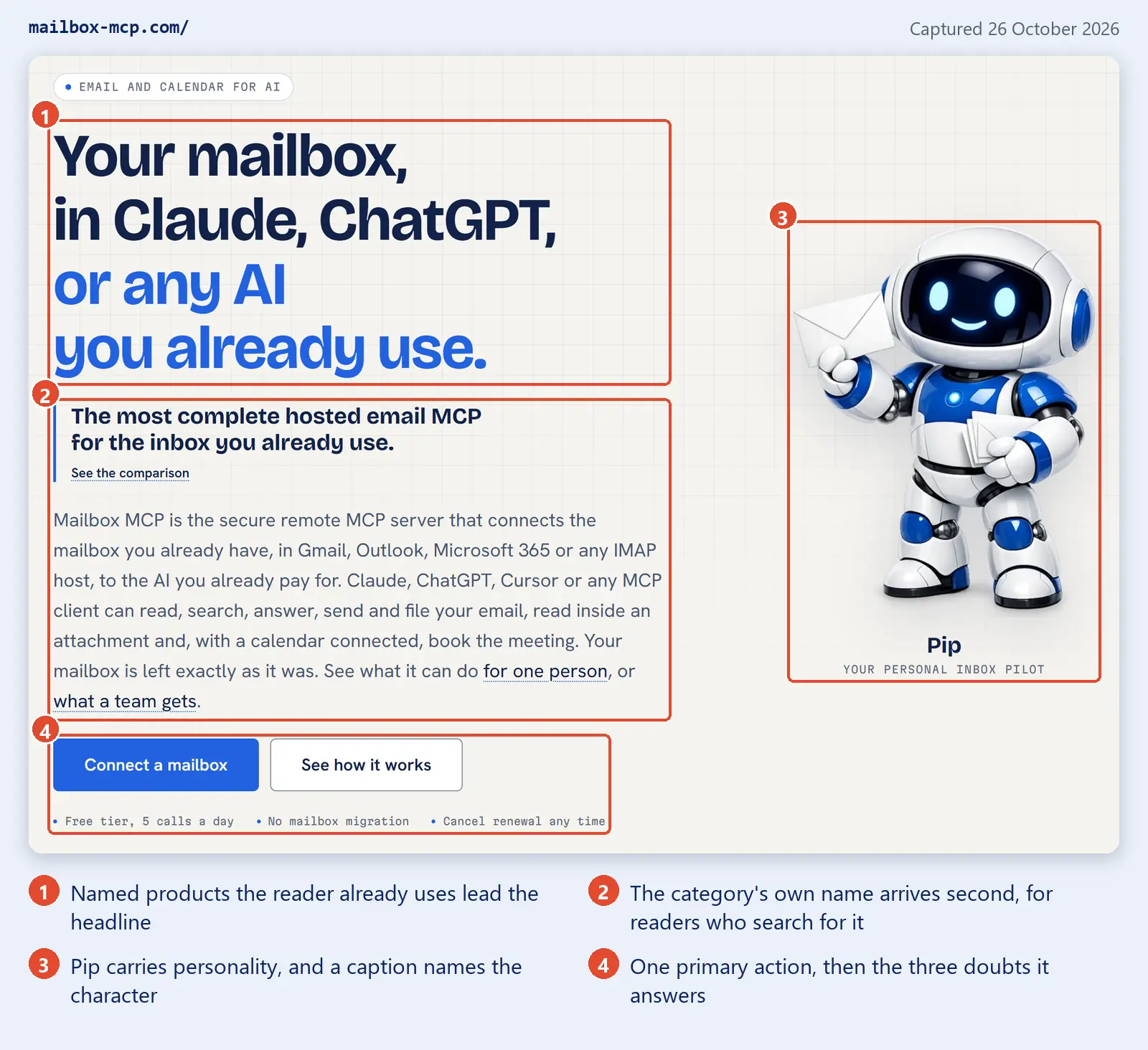
That second version lasted until 11 September, when I audited the site against what people actually type. I crawled it first, so the instinct could be checked rather than argued. Twenty of the 43 indexable page titles led with "MCP", "MCP Server" or "MCP Client". Then I checked six questions buyers really ask, phrases like "Can ChatGPT read my email?" and "How do I connect Claude to Gmail?". The word "MCP" appeared in none of them. People search with the name of the assistant they pay for, then "email" or "inbox", then "Outlook". Nineteen pages were retitled that day, and the hero became the one in the capture below.
The trap that caught us is worth stating plainly, because it's so easy to fall into. The site's own source code had comments, in three places, saying this reader types "can ChatGPT read my email". The page title still said "What AI Can Actually Do With Your Email". Knowing the question and writing the title in it are two different acts, and the gap survived nine deploys because no automated check asks whether a title contains a question anybody would ask. That page is now titled "Can AI Read My Email? What It Can Really Do".
April Dunford, whose positioning work I'd recommend to anyone launching a product, describes what good positioning does in one sentence:
It provides context and a frame of reference that makes it easy for customers to understand why they should care about what we do.
April Dunford, "A Product Positioning Exercise", 17 October 2019
The phrase that matters to me there is "frame of reference". When I first read it, I took it as a point about competitors: position yourself against the alternative. Building this site taught me it applies just as much to vocabulary. "MCP" is a frame of reference for developers and almost nobody else. "Claude" and "ChatGPT" are a frame of reference for anyone who has paid for an AI subscription, which is the person with an inbox problem. The headline didn't get cleverer when it changed. It just borrowed a frame the reader already had instead of asking them to learn ours.
The technical term didn't disappear, and it shouldn't have. It's in the brand name, the second line, the explainer pages and the comparison page, which is where a developer who searches for "email MCP server" will land. The rule I'd take from it is about order rather than deletion: the category name comes second.
Turning Technical Capabilities Into Tasks People Recognise
Under the hood, Mailbox MCP is a list of tools with names like search_emails and read_attachment. A feature page built from that list would be accurate and nearly useless to a business owner, who doesn't think in tool names. They think "find that invoice Hollis sent in March". The use cases page is built the other way round, and says so in its own introduction: "Every request on this page is one somebody would actually type, and every answer describes what happens to the mail rather than what the product supports."
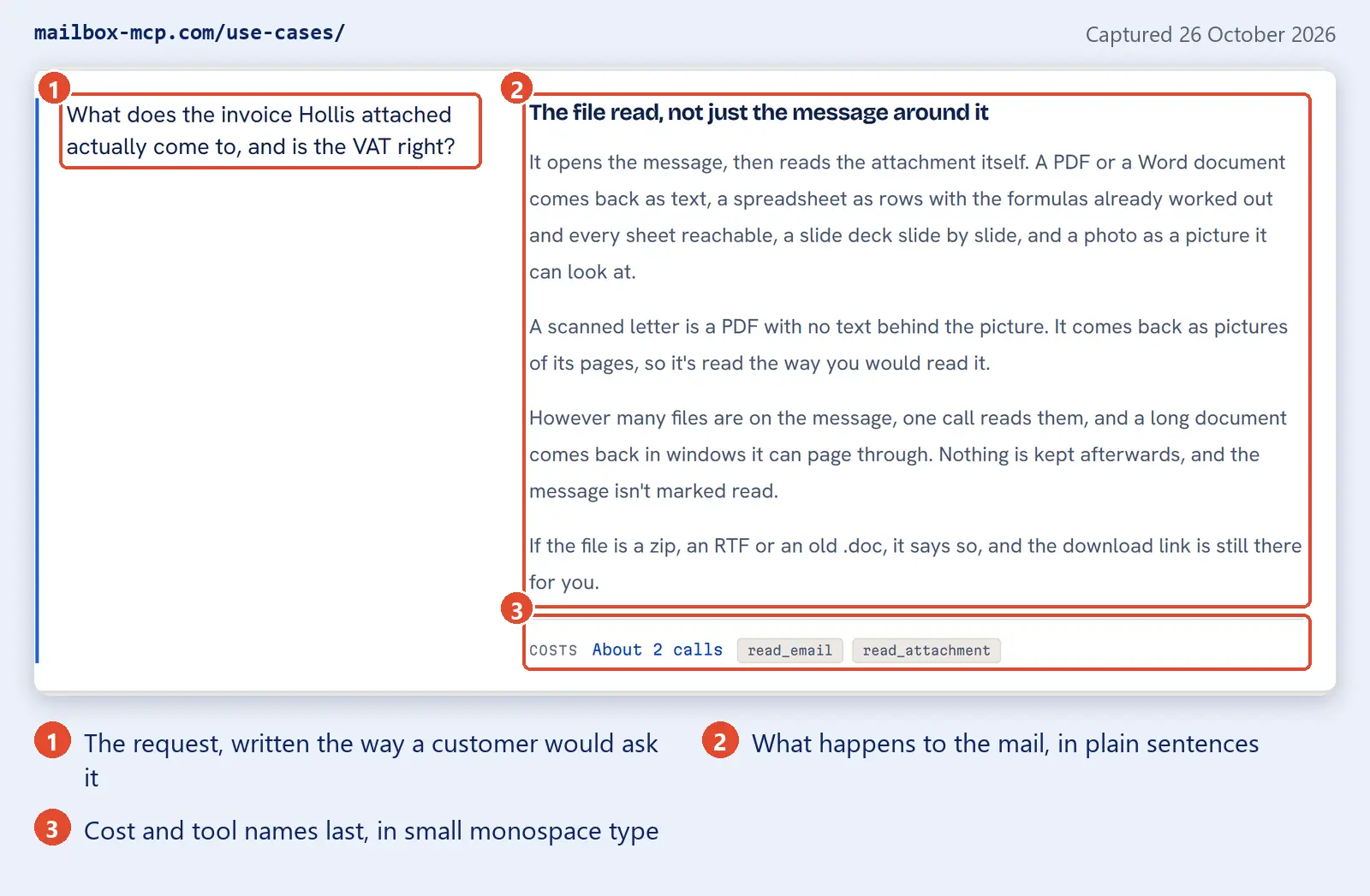
That card isn't invented for marketing. The attachment reader shipped on 12 September 2026, and its first real job was a one-page supplier invoice from a trade association sitting in our own sales mailbox. It came back as 863 characters of text, with the net, VAT and total on separate lines, and the VAT checked out at exactly 20% of the net. "Is the VAT right?" is on the page because it was the first thing I actually asked. The same pattern runs through the morning card, which opens with "Go through my unread mail and tell me which of these actually need me, and which are just noise", and then tells you that you need not even ask, because a morning brief routine can run at 07:00 every weekday.
If you're building a product with an AI or developer audience, the same rule applies one level down, in the tool descriptions a model reads. We wrote that up separately as nine design rules for AI-callable abilities, and the first rule is the same as this section: name the user's operation, not your endpoint. The attachment work itself, including the figure we got wrong for a month, is in our post on the four routes for email attachments.
The ledger: one device for two readers
A technical product has two audiences who want opposite things. The business buyer wants a plain promise. The developer, or the IT person the buyer forwards the link to, wants proof. The site's answer is a component it calls the ledger: a plain claim on the left, the evidence on the right, joined by a dotted leader, the way a mail header block is laid out.
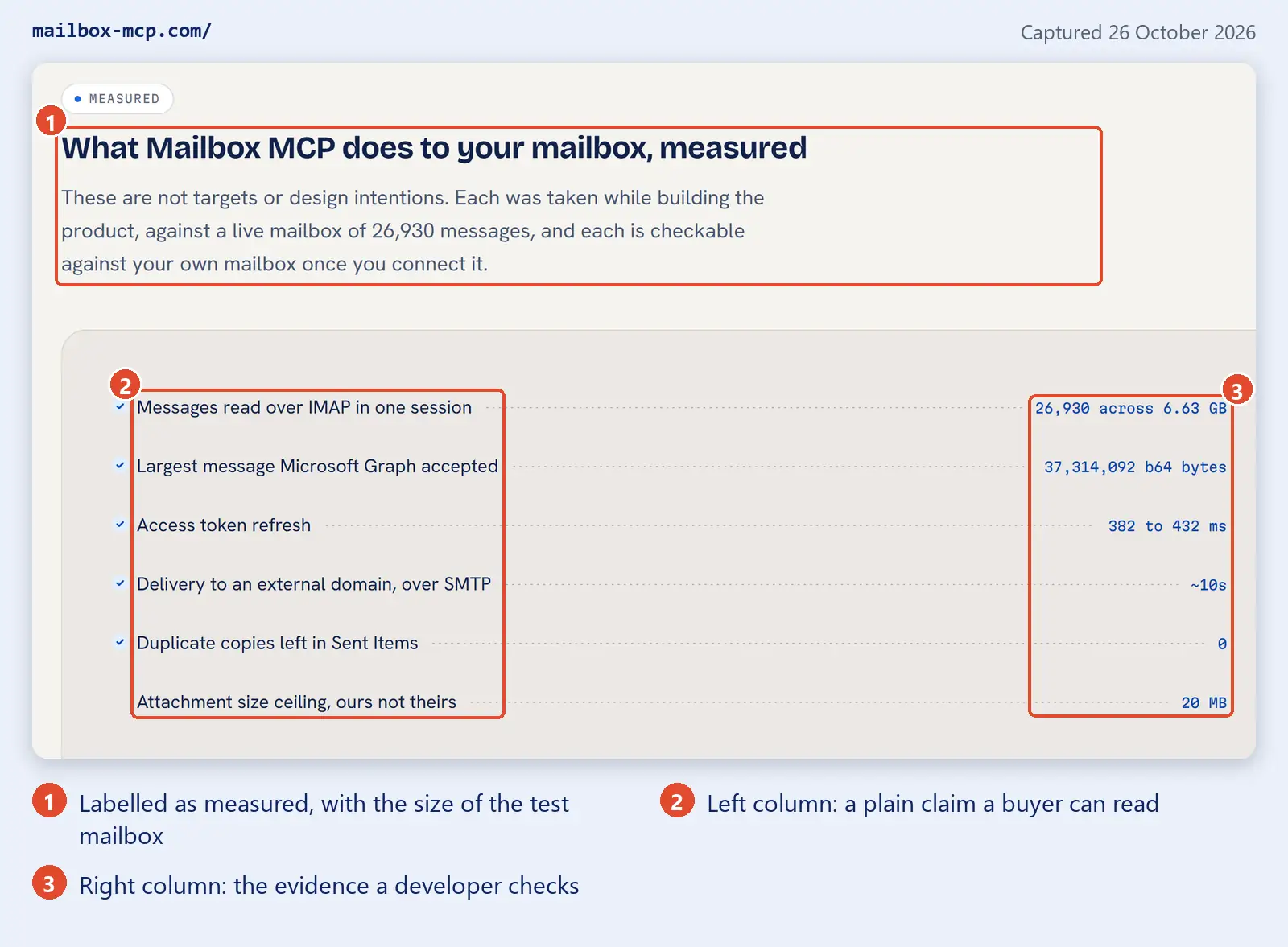
My reading of why this works: it lets one page serve both readers at their own level without a "technical details" toggle that half of them never open. I'd copy the rule more than the styling. Every value on the right has to be a fact that can be checked, and the moment someone writes "fast" or "secure" in that column, the whole device stops meaning anything.
Compatibility Information: State the Requirement, Not a Matrix
Compatibility is the first thing a buyer checks, and it should be. If you already pay for ChatGPT and your mail is in Outlook, the only question that matters is whether the two will talk. The obvious answer is a grid: every AI client down one side, a tick or a cross in each cell. We decided against it from the start, and I'd make the same call again.
Which assistants support remote MCP servers changes month to month. A grid of ticks would be wrong within weeks, in public, on a site whose whole argument is that its claims can be checked. So the works-with page states one requirement and gives the reader a test they can run on their own client, then tells them to trust their own client's settings over any table, ours included. There's a written rule behind it too: never publish a list of products that do not support MCP.
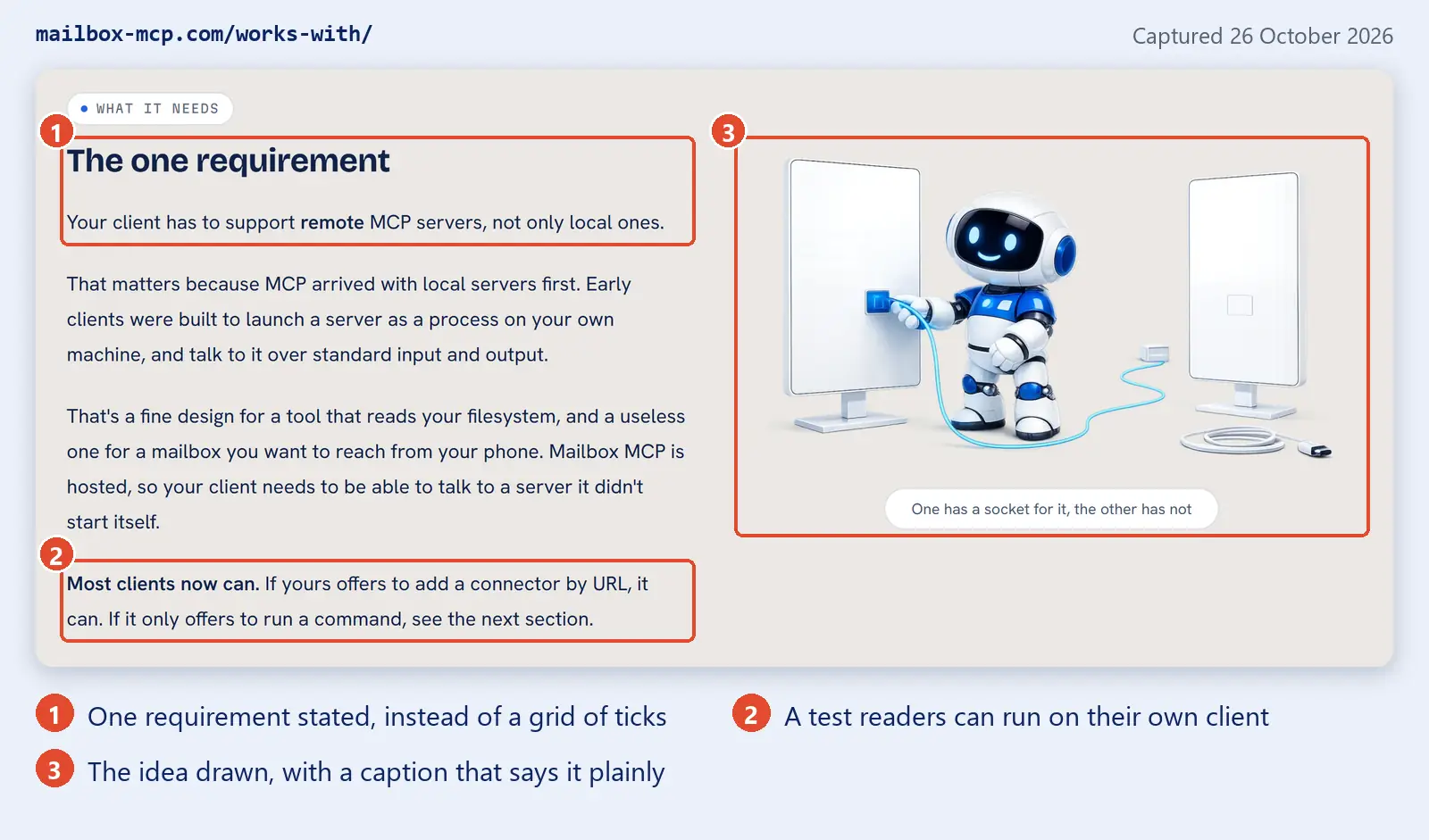
There's a distinction in there I think most product sites miss. The mailbox side of the page is concrete and specific: Microsoft 365 with one Microsoft sign-in, Gmail with an app password, any other host with its IMAP settings, and exactly what each one gets. That's our own product's behaviour, so we can keep it true. The AI side is stated as a requirement, because it's other companies' behaviour and it moves. It has already moved once: on 1 October, once Mailbox MCP was listed in ChatGPT's directory, the ChatGPT guide was reordered to put that route first, and stopped saying developer mode was the only way in.
The home page still names the clients, in a monochrome strip under the hero, but each tile is a link to that client's set-up guide rather than a tick. Naming the client tells the reader "yes, people use this with yours". Linking it to the guide turns a claim into a route. For a wider comparison of what each assistant can do with email, our sister site has a dated comparison of ChatGPT, Claude, Copilot and Gemini.
Setup Guides That Show the Work Before Anyone Signs Up
A setup guide is normally treated as support content. On a technical product site it's sales content, because it's the only honest answer to "how much work is this going to be?". The Gmail guide opens with a list of what you need before you start, in the same ledger shape as the home page.
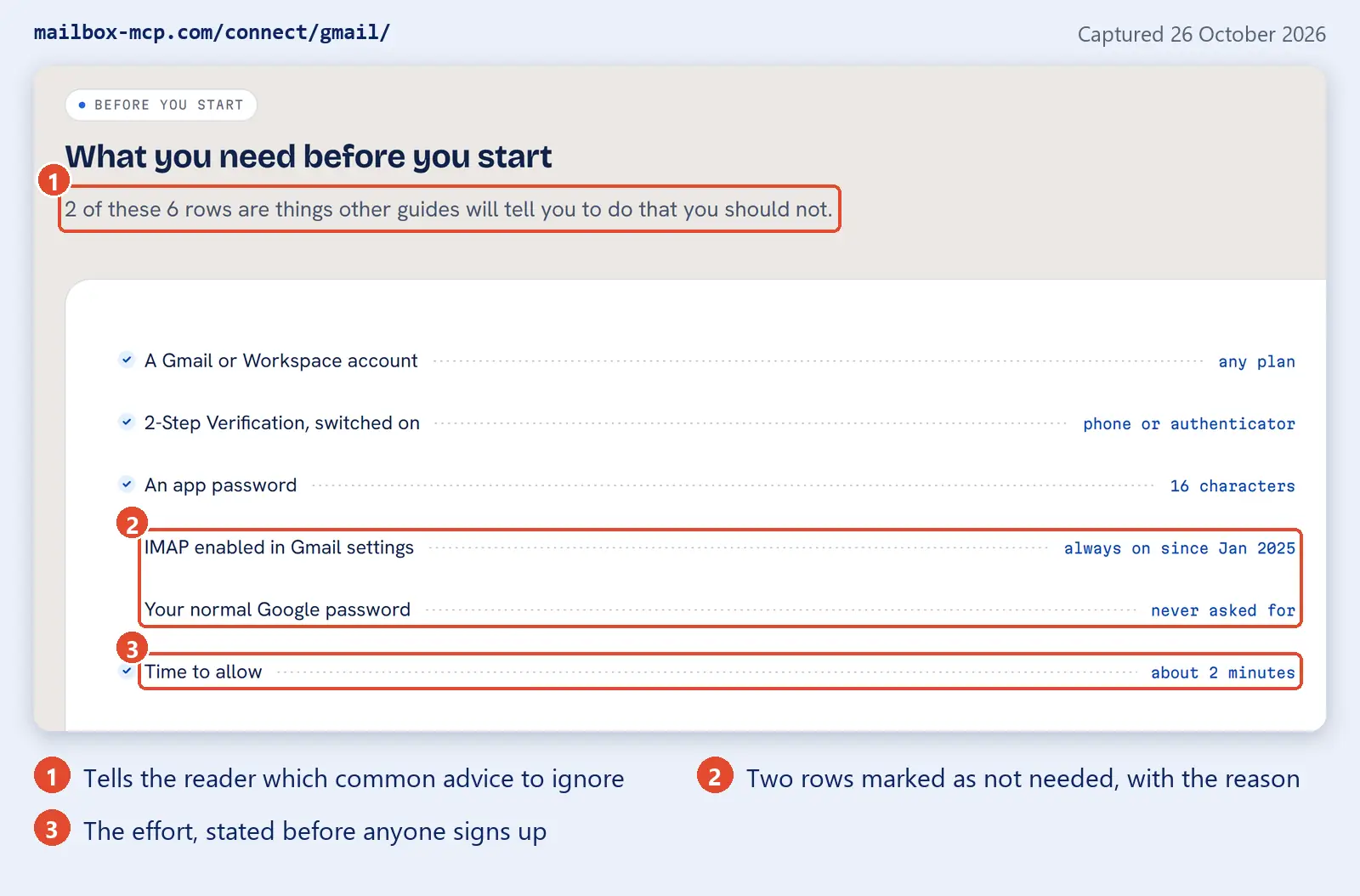
The line I'd steal for any product is the first one: "2 of these 6 rows are things other guides will tell you to do that you should not." It's specific, it's slightly cheeky, and it tells the reader this guide was written by someone who has done it, which no adjective can.
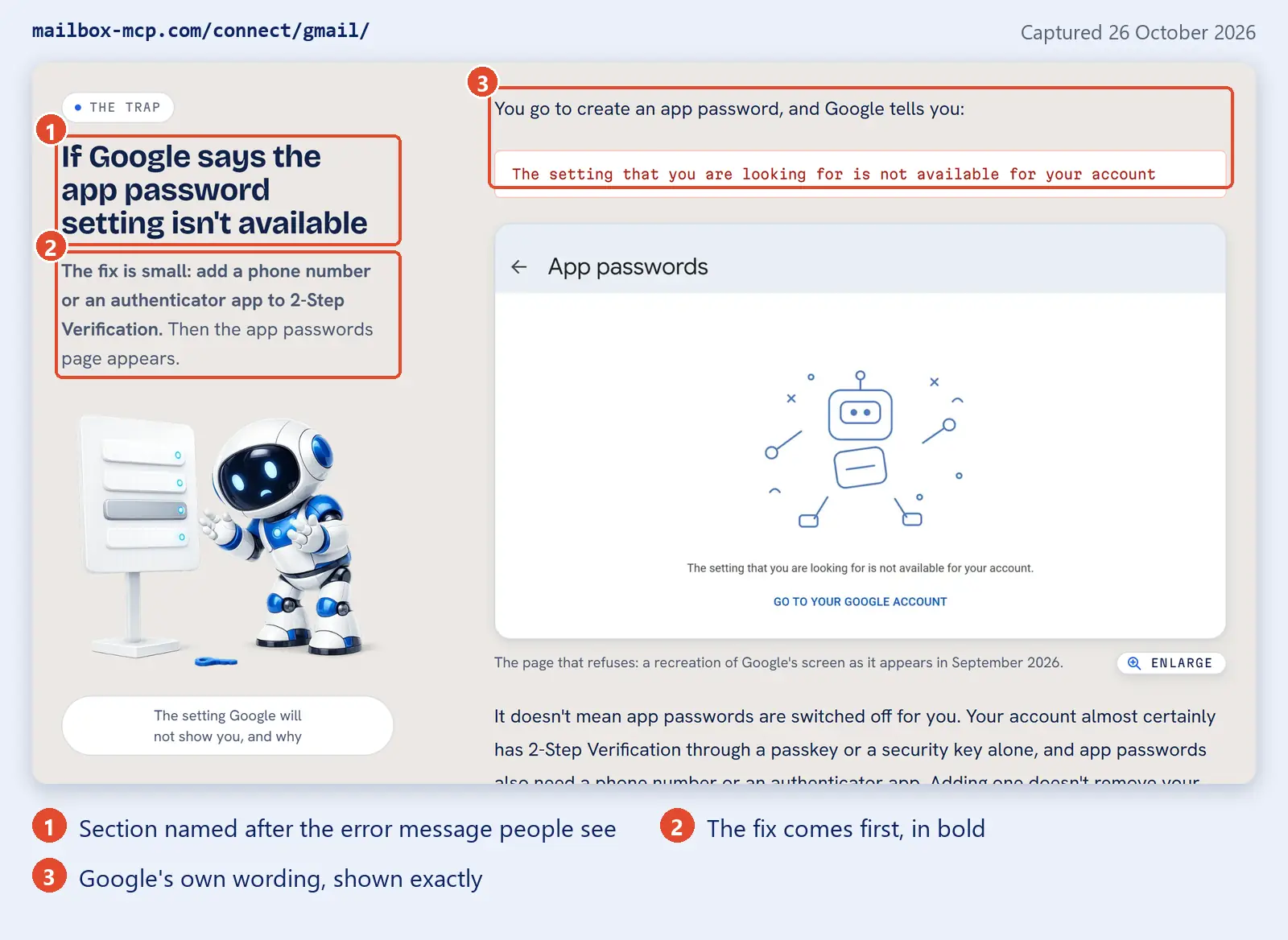
The reason the guide is this careful is in the launch-day figures. On 18 September, of the 17 people who signed up, 12 stopped at the step where they connect a mailbox. One Gmail user tried three times in 43 seconds, got "Application-specific password required" twice and "Invalid credentials" once, and left. Google's app password page has a habit of saying the setting isn't available, which sounds like a dead end and usually isn't, so that section of the guide is named after the exact words people see.
The Microsoft guide has a different job. A password simply cannot open a Microsoft 365 mailbox any more: Microsoft's own documentation says that "Basic authentication is now disabled in all tenants", with 1 October 2022 as the date for most of the world. So the guide's work is to explain that this is normal, that connecting takes one Microsoft sign-in, and that you don't need to ask IT to switch on Authenticated SMTP, because sending goes through Microsoft Graph instead. Turning a step your customer would have dreaded into a step they can skip is one of the few persuasive things a setup guide can do.
Support tickets keep reshaping these pages, which is how it should be. On launch day a Hotmail user got through Microsoft's consent screen four times and failed at the mail server four times, because a setting called "Let devices and apps use IMAP" was off on the account. On 5 October personal Outlook.com and Hotmail accounts got a guide of their own. If your support inbox keeps answering the same question, that answer belongs on the website, before the sign-up button.
Security and Pricing Pages That Answer the Buying Questions
Letting an AI into your email is a big decision, and the security page starts by saying so. Its headline is "What we hold, and what we will not do", and its first paragraph promises "straight answers rather than a badge".

One decision here sits awkwardly with the rest of this post, so I'll be open about it. Until 17 September the site had a Certifications row that listed, in its own words, what it didn't have: no SOC 2 report, no ISO 27001, no Cyber Essentials, no third-party penetration test. That list appeared in seven places. On 17 September BSolve IT Limited passed Cyber Essentials, and my ruling that day was: "From now on we don't want to say what certification we lack, only what we've got." The seven places became one positive statement, with the certificate and the registry link so a procurement team can check it in one click.
Is that less honest? I don't think so, and here's the line I draw. A product limit changes what the customer can do, so it stays on the page. A list of standards you don't hold doesn't tell the customer anything they can act on; it reads as a list of reasons to say no, written for them. Anyone with a security questionnaire still gets a straight answer, because the FAQ asks "which certifications do you hold?" and answers it.
One price list, stated once
The pricing page headline is the policy: "One price list, stated once." The paragraph under it makes a promise that most pricing pages couldn't keep: "Those are the same figures on every page of this site and the same figures in the control panel."
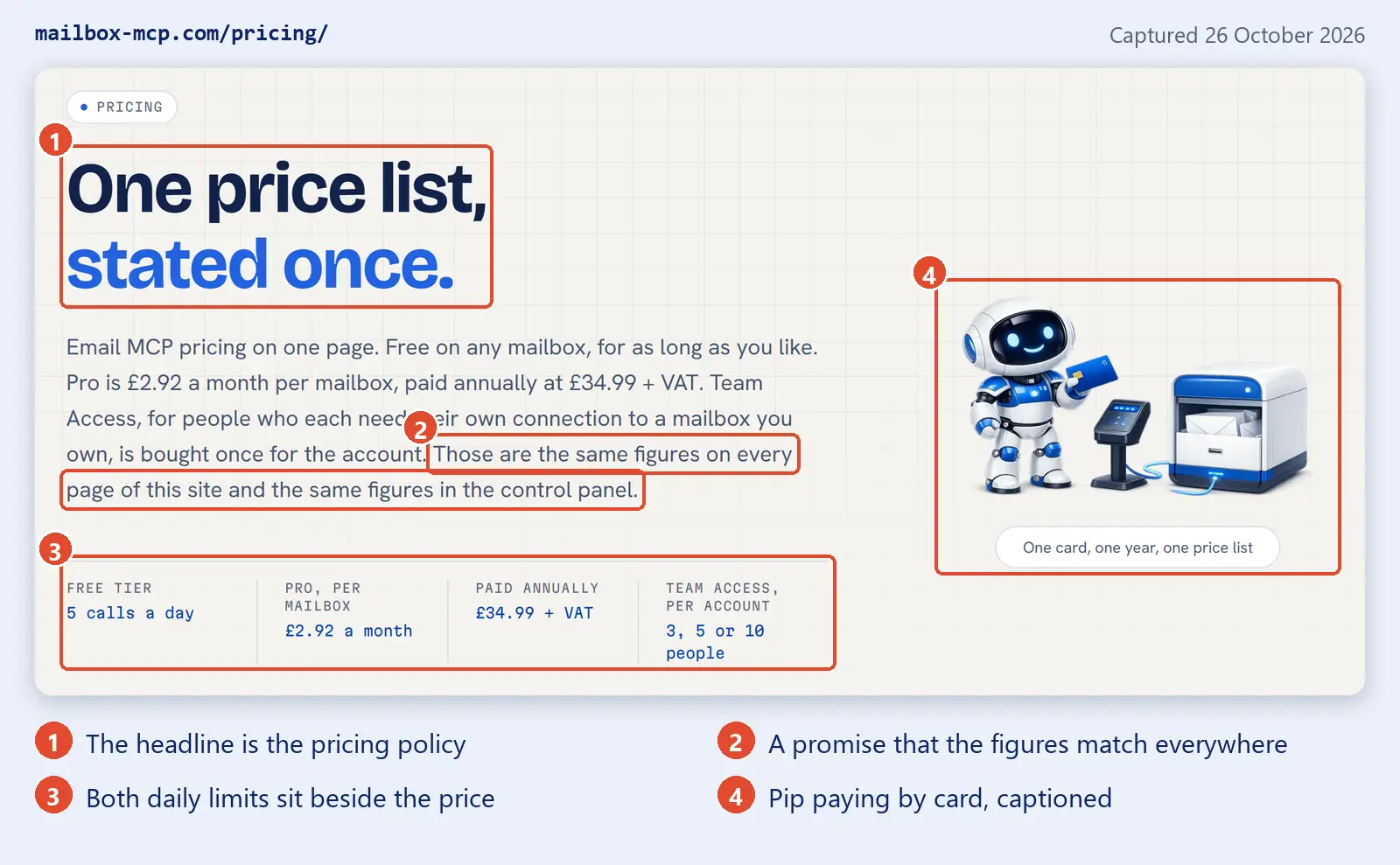
That promise is kept by code, not by care. Every price and limit is held once, as a constant in the site's configuration, and every page prints it from there. Here's an excerpt from the real file, with the comment that explains why it exists:
// Stated once, here, and read everywhere it is shown. The nearest competitor
// advertises one price on its marketing pages and bills another in its panel,
// and shows two different daily limits on two different pages. One constant per
// fact is the cheapest possible defence against repeating that.
define( 'MBX_PRICE_PRO',      '34.99' );   // per mailbox per year, GBP, NET
define( 'MBX_PRICE_VAT_NOTE', '+ VAT' );   // travels with the figure, always
define( 'MBX_FREE_CALLS_DAY', 5 );         // per mailbox per day
define( 'MBX_PRO_CALLS_DAY',  1000 );      // per mailbox per day
A check script runs before every deploy and compares those constants with the limits the server actually enforces. If the website and the product ever disagree, the deploy fails. It's the same idea we used on a removals site where one data layer feeds the page, the schema and the AI discovery files: if a fact lives in one place, two pages can't contradict each other.
Therese Fessenden at Nielsen Norman Group put the reason for all this well, writing about what B2B sites can learn from consumer ones:
By clearly explaining what is and is not available in each tier or plan, the company is transparent and upfront, building trust in the organization.
Therese Fessenden, Nielsen Norman Group, "What B2B Designers Can Learn from B2C About Building Trust", 1 September 2019
What struck me is the phrase "what is and is not available". Most pricing pages are very good at the first half. The second half is where a technical product earns or loses trust, because a technical buyer has usually been burned by a plan described as "unmetered" that turned out to have a ceiling. On 26 August three pages on this site said "unmetered day to day use" about Pro. They were corrected the same day: Pro has a ceiling of 1,000 calls a day per mailbox, and the site now states it every time it states the free limit. Naming one limit and not the other reads as "the other one is unlimited", which is the same fault by omission.
Publishing What the Product Does Not Do
Every page on the site carries a limits section. It's a written rule in the project, and the reasoning is simple: the people this product is for have been sold things that overpromise, so the persuasion has to come from precision and from admitting limits, not from enthusiasm. The home page version sits above the pricing, where people read it before they connect anything.
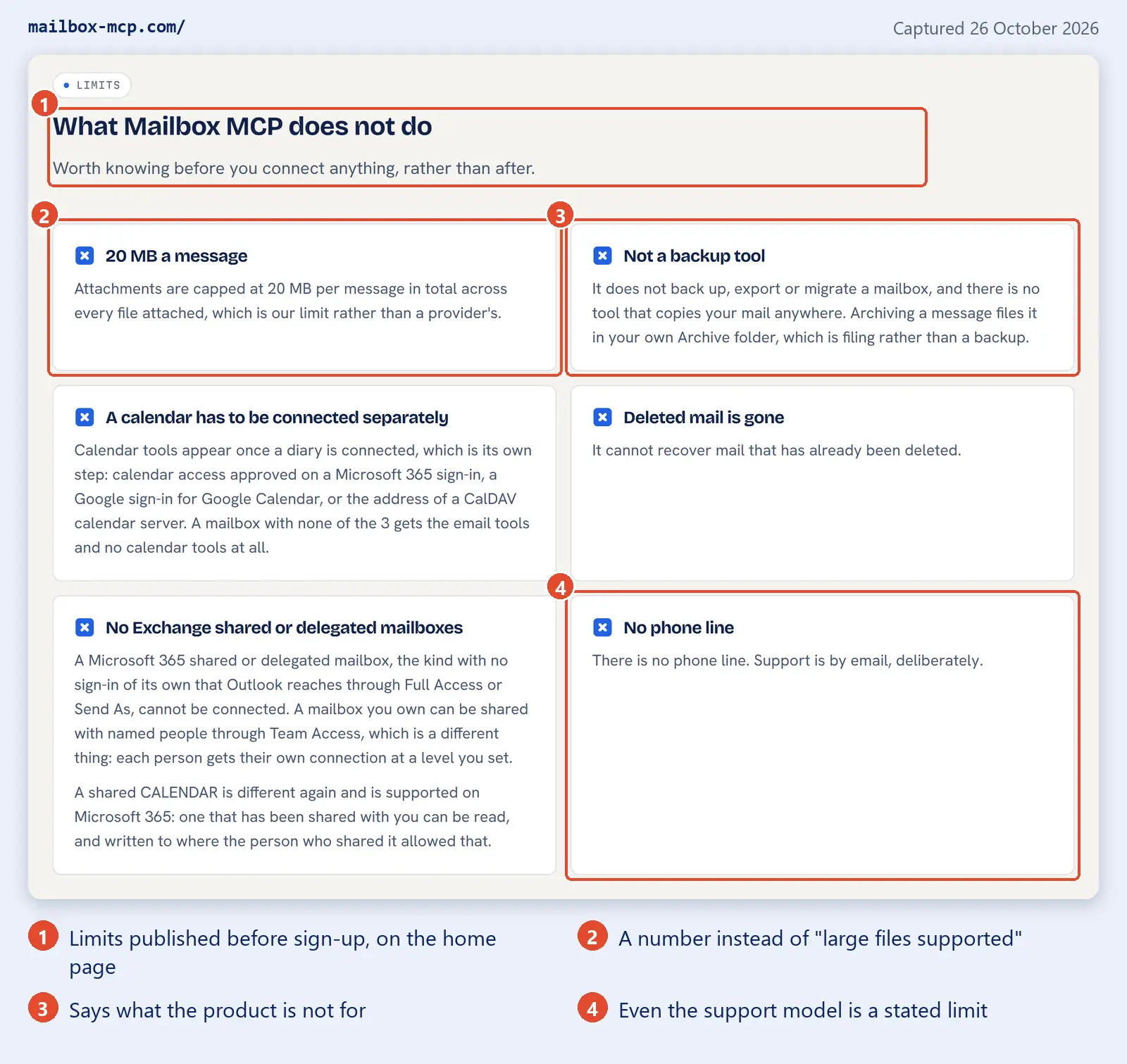
The detail I like most is the last card: "There is no phone line. Support is by email, deliberately." Plenty of small software companies have no phone line. Very few say so on the home page, and saying so turns a gap into a decision. The use cases page does the same with a section titled "What people ask for that this cannot do", which answers the requests that come up and get a no.
I'd add a caution from experience here. A limits section is only worth having if it stays true, and limits change faster than features do. The attachment ceiling on this site has already moved from 10 MB to 20 MB, and the figure comes from the same kind of constant as the prices, so the change reached every page at once. If your limits are typed by hand into five pages, one of them will be wrong within a quarter, and a wrong limit is worse than none. We learned a version of that lesson on what Google rewards in non-commodity content: being specific only builds trust while the specifics are true.
Giving a Technical Product Personality: Pip the Mascot
Pip, the small white and blue robot in most of these captures, is the third artwork direction the site tried, and the first two failures taught more than the success. The first was flat engineering drawings. The second was glossy, abstract precision hardware: beautiful sculptural objects, deliberately briefed with no envelopes, mailboxes or screens in them. My note on seeing them was blunt: "Nothing in them is recognisable? Nothing." The brief had asked for exactly that, and got it.
Two tests came out of that rejection, and every scene since has had to pass both:
- A stranger glancing for one second can say what is happening, as in "a little robot is sorting the post".
- Recognisable mail (letters, a mailbox, a padlock) and visible technology (a screen, a lit cable) are both in the frame, and joined.
The rest is discipline. Every new scene is drawn from the same master character sheet, so it is visibly the same robot each time; five slightly different robots read as clip art rather than as a character. The palette is locked to four colours, and any render that drifts into purple or teal is rejected. The scenes sit on the page as cutouts with no box around them, and each one carries a caption in plain words, like "One has a socket for it, the other has not" on the works-with page and "One card, one year, one price list" on the pricing page. Pip also appears in each of the getting-started emails, so the face a customer meets on the website is the face that turns up in their inbox. The colour work behind a palette like that is the same process we described in our post on testing brand colours for accessibility.
Here's where I'd be careful with this lesson. Pip makes an abstract product likeable and gives every page a consistent face, but Pip explains nothing. Look back at the hero capture: the robot is on the right, and every word that tells you what the product does is on the left. If you removed Pip, the page would still make sense. If you removed the copy, Pip would be a cute robot holding an envelope. A mascot also has a real running cost. The master renders kept for this one take up about 21 MB of the project, and there are rules for cropping, image sizes and phones (the robot in the author box isn't fetched on a phone at all). I have no measurement showing Pip changes sign-ups, and I'm not going to pretend one exists.
What This SaaS Website Case Study Cannot Prove
Here's the list of things this post doesn't show, because a case study that only reports what went right is an advert.
- No A/B tests were run. Every decision above was made on reasoning and evidence about wording, not on measured conversion. I can't tell you any single element earned a sign-up.
- No channel has been isolated. Directory listings, search and product releases all landed in the same five weeks as most of the copy decisions. The growth figures can't be split between them.
- The site didn't fix the drop-off on its own. On launch day 12 of 17 sign-ups stalled at the mailbox step. Some of the fix was on the website, in the setup guides. Some of it was in the control panel, which isn't the subject of this post.
- The retitling hasn't been scored yet. The September title changes were made to match real queries. Whether they moved rankings is something to check in Search Console at 90 days, not something to claim at six weeks.
- The pages are long. The home page has fifteen sections. Every one earns its place on paper, but nobody has tested whether a shorter page would do better, and I suspect for some visitors it would.
- We are not neutral. This is our own product, described by its founder. The captures and the dated decisions are there so you can judge the pages for yourself rather than take my word for them.
A Checklist for Explaining a Technical Product on Your Own Website
None of this is specific to email, AI or even SaaS website messaging. If your business sells something that takes more than a sentence to explain, whether that's a piece of software, an engineering service or a regulated product, these are the steps I'd take, in this order. They're also the habits we bring to our own website design projects:
- Write down the questions buyers actually type. Before writing a headline, collect the questions customers ask in their own words, and check which ones real people search for.
- Lead with what the reader already knows. Name the products, tools or situations your buyer already recognises in the headline, and let your category term arrive second.
- Turn each capability into a request. Write each feature as something a customer would ask for, then say what happens, and put the technical name last.
- Pair every claim with checkable, dated evidence. Put a plain claim beside the measurement that proves it, say when it was measured, and keep adjectives out of the evidence.
- State compatibility as a requirement or a test. Describe the one thing a customer's setup needs and how they can check it, instead of a grid of third-party products that will date.
- Show the setup work before sign-up. Publish what a customer needs, what they do not need, and how long it takes, and name each common error after the words it shows.
- Hold prices and limits in one source. Store every price and limit once and print it everywhere from that source, so no two pages can disagree.
- Publish what the product does not do. Put a short limits section on the pages people read before buying, with numbers rather than vague reassurance.
If you'd like to see these choices on a very different kind of site, our anatomy of a local business website we launched in July applies the same habits, dated evidence and plain claims, to a chauffeur firm. And if you want a feel for Mailbox MCP from the customer's side, our sister site's guide to connecting your AI to your email and calendar is written for exactly the reader the product site is trying to reach. We also use it ourselves on client work; 365i Web Design described what that looks like in a piece on client communication during a web build.
Frequently Asked Questions
How do you explain a technical product on a website?
Start from what the buyer already knows and the job they want done, not from your category. Name the products they already use in the headline, describe each capability as a request a customer would make, and put the technical term second. Then back every claim with something checkable, such as a dated measurement, a setup guide or a published price.
Should a SaaS website use technical jargon?
Yes, but not first. Technical buyers search for the category term, so it belongs on the site, in the brand name, a subheading and a dedicated explainer page. It should not be the word a newcomer has to understand before the headline makes sense. Mailbox MCP keeps "MCP" in its name and second line, and leads with Claude, ChatGPT and "any AI you already use".
Should a product website publish a compatibility list?
Only for facts you control and can keep current. Mailbox MCP lists which mailboxes work and what each one gets, because that is its own product behaviour. For third-party AI clients it states one requirement, support for remote MCP servers, and a test the reader can run, because a grid of other companies' products goes out of date within weeks.
Should a product website show its limitations?
Yes, on the pages people read before they buy, and with numbers. A limit a customer finds after paying reads as a broken promise; the same limit stated up front reads as a straight answer. Mailbox MCP's home page lists six things it does not do, including a 20 MB attachment ceiling and the fact that it is not a backup tool.
Does a mascot help a technical product website?
It can give an abstract product a face, but it cannot do the explaining. On Mailbox MCP, Pip appears in every scene and in the onboarding emails, while captions and plain copy beside him say what is actually happening. We have no measurement showing Pip changes sign-ups, so treat a mascot as personality and consistency rather than proven conversion.
Did the website cause Mailbox MCP's growth?
We cannot say. The account count grew from 13 the day before the Claude directory listing went live to 4,161 on 26 October 2026, during the same weeks as listings in the Claude and ChatGPT directories, search traffic and product releases. No A/B tests were run and no channel has been isolated, so the figures show scale, not cause.
Should SaaS pricing be shown on the website?
For a self-serve product, yes, and every limit should sit beside the price. Mailbox MCP prints its Free tier of 5 calls a day and Pro at GBP 34.99 + VAT a mailbox a year with its 1,000-call daily ceiling, from one set of constants, so the same figures appear on every page and in the control panel.
Who built the Mailbox MCP website?
It was built in-house at BSolve IT Limited, the company behind both Mailbox MCP and Press Forge, and the author of this post founded the product. It was not a Press Forge client commission, which is why this is written as a first-hand account of our own decisions rather than as a client case study.
Selling Something That Takes Too Long to Explain?
We build websites for businesses whose offer doesn't fit in a sentence. We start from the questions your customers actually ask, put the evidence beside every claim, and keep prices and limits consistent on every page. If your current site makes people learn your vocabulary before they understand what you do, talk to us.
Talk to Us About Your WebsitePublished: 26 October 2026 · Last reviewed: 26 October 2026 · Written by: Mark McNeece, Founder & Lead Developer, Press Forge
Editorially reviewed by: Mark McNeece on 26 October 2026 · Our editorial standards
Sources
- Mailbox MCP home page, hero, measured ledger and limits (captured 26 October 2026)
- Mailbox MCP, What people actually ask for (captured 26 October 2026)
- Mailbox MCP, Works with Claude, ChatGPT, Cursor and any MCP client (captured 26 October 2026)
- Mailbox MCP, How to connect Claude to Gmail (captured 26 October 2026)
- Mailbox MCP, Security (captured 26 October 2026)
- Mailbox MCP, Pricing (captured 26 October 2026)
- A Product Positioning Exercise - April Dunford (17 October 2019)
- What B2B Designers Can Learn from B2C About Building Trust - Therese Fessenden, Nielsen Norman Group (1 September 2019)
- Deprecation of Basic authentication in Exchange Online - Microsoft Learn
- Introducing the Model Context Protocol - Anthropic (25 November 2024)
- Mailbox MCP internal dashboard figures, 26 October 2026, and launch-day sign-up aggregates, 18 September 2026 (BSolve IT Limited, not published elsewhere)