WordPress 7 is close, but not quite here yet. The original 9 April 2026 launch slipped past WordCamp Asia (we covered why), and the core team is due to publish a revised schedule on 22 April. The AI Connectors and real-time collaboration are catching all the headlines in the run-up. There's a quieter change in the same release that I suspect will matter more over the next five years. Block Bindings. Not new exactly, the API has been creeping in since WordPress 6.5, but 7.0 is where it stops being a developer curiosity and becomes something every growing site should be built around. One source of truth, edited once, reflected everywhere. Cleaner pages, faster caching, stronger SEO, and content an AI can actually read. It's the upgrade most people will scroll past on the release notes. And most people will be wrong to.
What Block Bindings Actually Do
Strip away the terminology. A WordPress page is made of blocks. A Paragraph block holds text. A Heading block holds a heading. An Image block holds an image. Traditionally, the content of each block has been baked directly into the block's HTML. You typed "Our price is £29.99" into a Paragraph block and that exact string became part of the saved page content.
Block Bindings change that relationship. Instead of the Paragraph block holding the text directly, it can be told: go and fetch your text from the product_price custom field. The block becomes a presentation container. The content lives somewhere else. Where the data lives, and where it gets displayed, are now two different things.
"Instead of creating a new custom block, you could use a core block, like a paragraph, heading, or button block, and just tell WordPress to 'connect' that block to the product data."
Brian Coords, WP Tavern (March 2024)
Generic blocks reading from named sources is how proper content models work, and WordPress spent 20 years not quite offering that. The block stays generic. The connection does the work. That single reframing changes how you design templates, how you plan content, and how you think about what a theme even is.
The Four Built-in Block Binding Sources
Every WordPress install comes with four ready-to-use binding sources. Each one is a way of saying "get the content from over there":
core/post-meta: pulls from any registered custom field on the current post.core/post-data: exposes publication date, modified date, author, and permalink from the post itself.core/term-data: reads from taxonomy terms when a block is used in a term context.core/pattern-overrides: lets a synced pattern carry per-instance edits rather than being locked to a single shared value.
The core blocks currently supporting bindings are Paragraph, Heading, Image, Button, Navigation Link, and Post Date. Developers can register custom sources via register_block_bindings_source() to pull from anywhere, including external APIs, REST endpoints, or site-wide option values.
A Quick Code Example
Here's what registering a custom source looks like. This example creates a binding that exposes the site's registered contact phone number to every supported block:
<?php
// functions.php or a plugin
add_action( 'init', function() {
    register_block_bindings_source( 'twc/contact-phone', [
        'label'              => 'Contact Phone',
        'get_value_callback' => function() {
            return get_option( 'twc_contact_phone' );
        },
    ] );
} );
In the editor (or directly in block markup), the binding is attached to a paragraph or heading via the block's metadata.bindings property:
<!-- wp:paragraph {"metadata":{"bindings":{"content":{"source":"twc/contact-phone"}}}} -->
<p>Placeholder phone number</p>
<!-- /wp:paragraph -->
That paragraph will now always render the value returned by your callback, no matter how many templates or pages it appears in. Change the option once, change the displayed number everywhere.
Block Bindings Timeline: WordPress 6.5 to 7.0
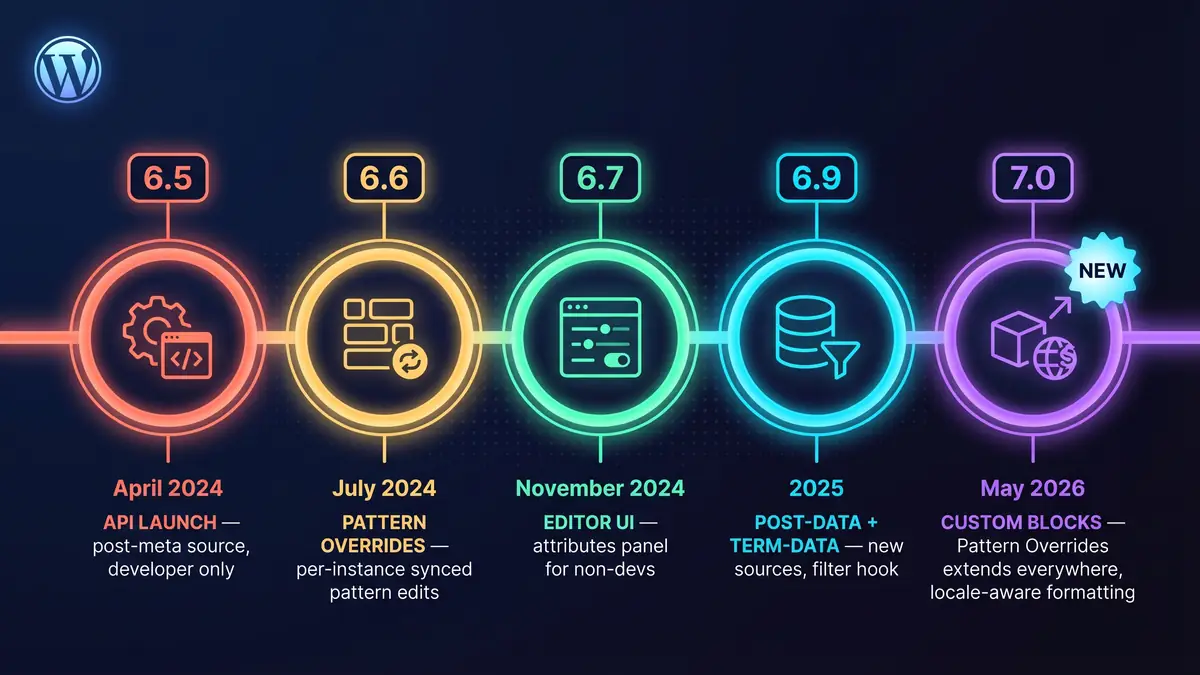
The API has shipped in stages since spring 2024, and understanding the chronology helps explain why WordPress 7 is the moment it becomes properly useful:
- WordPress 6.5 (April 2024): initial API release. Developers only, no UI,
core/post-metasource only. - WordPress 6.6 (July 2024): synced pattern overrides added as a bindings source, enabling per-instance edits inside reused patterns.
- WordPress 6.7 (November 2024): the editor Attributes panel lands. Non-developers can now bind Heading, Paragraph, Button, and Image blocks to custom fields via a dropdown.
- WordPress 6.9 (2025):
core/post-dataandcore/term-dataadded, plus an extensibility filter for supported attributes. - WordPress 7.0 (expected mid-to-late May 2026): Pattern Overrides extends to custom blocks via the
block_bindings_supported_attributesfilter, and the editor handles locale-aware number and date formatting automatically.
Matias Ventura, the Gutenberg project's lead architect, has been framing this direction publicly since the WordPress Developer Blog's own walkthrough, and the shape of the API is firmly pointed at structured content as a first-class citizen of the platform.

How Block Bindings Compare to Microsoft's Windows DNA Architecture
I remember reading a piece about Block Bindings back when 6.5 dropped. The first thing I thought was: we've done this before.
Specifically, 1999. Microsoft had a reference architecture called Windows DNA, short for Distributed interNet Applications. It laid out a three-tier model for building enterprise systems:
- Presentation tier. Whatever the user saw on screen. ASP pages, DHTML, the browser.
- Business logic tier. The middle layer that validated inputs, applied rules, and decided what data to fetch. Usually COM components running on Microsoft Transaction Server.
- Data tier. Storage. SQL Server sat at the bottom doing what databases do.
The point of DNA wasn't that any one tier was clever. The point was keeping them separate, so you could change one without breaking the others. You could redesign the presentation layer without touching the database. You could swap the database without rewriting every page. The rules of your business lived in a place that wasn't mixed up with either.
Block Bindings is that pattern, arriving in WordPress 27 years later.
- Presentation tier is the blocks.
- Binding layer is the Block Bindings API, routing between the two.
- Data tier is post meta, custom fields, term data, anything you register as a source.
The parallel isn't perfect. WordPress is a CMS, not an enterprise transaction system, and COM was a much heavier piece of engineering than a PHP filter and a data source callback. But the shape is the same. And the benefits are the same. Content stops being tangled up with the pages it appears on.

Content Versus Presentation: The Simple Version
If you find the architectural framing dry, here's a plainer way to think about it.
Imagine a restaurant that wrote its prices directly on the wall in permanent marker, repeated in six different places across the menu, the website, the chalkboard outside, and the receipts. When the price of a dish changes, someone has to walk around with a paint scraper.
Now imagine the same restaurant keeps a single spreadsheet of prices. The menu, the website, the chalkboard, and the till all read from it. Change the spreadsheet and every display updates at once.
That's Block Bindings. One source of truth, many ways to show it. The blocks become surfaces that read from the data, instead of containers that own it.

Why This Is a Big Deal
The philosophical argument is fine, but the practical payoff is where it stops being academic. These are the wins you feel on a real client site, usually in the moment you realise the old way was costing you hours you didn't know you were burning.
Edit Once, Update Everywhere
This is the headline benefit, and the one that sells the idea to a client in about 30 seconds. Change a price in one field, and every Heading, Paragraph, and Button bound to that source updates across the whole site. No search-and-replace. No reopening 40 pages. No risk of missing one and leaving the old number live for six months. One edit, everywhere.
"Separating data sources from presentation makes systems easier to maintain. When you need to change how data is fetched or processed, you modify the binding source, not every block that uses it."
Jon Imms, WordPress Block Bindings API: Dynamic Content in Custom Blocks
I've lived the alternative more times than I'd like to admit. In 25 years of WordPress work at Press Forge, the most common support ticket pattern isn't a bug. It's "we've changed our phone number, can you update it everywhere?" A recent client rebrand at our agency turned into 217 hardcoded references across 84 pages. Had the site been built around bindings from day one, that afternoon would have been a single field edit. The first time it happens on a real site you feel slightly annoyed with yourself for not building this way the whole time.
Since we started rebuilding client sites around structured content, we've seen content-update tickets drop by roughly 60 to 70 percent across the maintenance plans we run. That's time we bill for less of, which clients notice, and time we can reinvest in strategic work rather than chasing typos.
Rock-Solid Consistency Across the Site
When the same price, the same contact number, the same opening hours, and the same legal disclaimer are all bound to a single source, they cannot drift. Three different editors cannot update them to three different values in three different posts. You cannot forget to change the footer when you change the header. The source is the source. For anyone who has ever found a typo in a footer that nobody updated since 2019, that's a quiet but real quality-of-life improvement.
Consistency also matters at audit time. A site that can prove its prices, addresses, and company details come from a single field passes a GDPR or compliance audit faster than a site where the same information is scattered across 200 hardcoded pages. Less scope for "we meant to update that".
Faster Sites, Smarter Caching
Bound core blocks use lean core markup. They don't need a render_callback on every instance, which means the server does less work on every request. For sites drifting towards large numbers of lightly customised pages, that alone can shave meaningful milliseconds off time-to-first-byte.
The bigger performance story is caching. Structured content produces predictable markup, and predictable markup caches beautifully. Page cache, edge cache, CDN cache, object cache: every layer gets a more consistent view of what's on the page and can serve it faster from memory. On performance-focused WordPress hosting with server-level caching, structured pages are where you start seeing green Core Web Vitals scores almost by default rather than as the result of a fight.
Stronger SEO and Schema That Actually Stays in Sync
Search engines and AI systems want clean, machine-readable information, and they punish sites where the visible content and the structured data disagree. The classic SEO bug is a JSON-LD schema claiming a product costs £99.99 while the visible page says £89.99. Googlebot notices. Most site owners don't.
Block Bindings quietly fix that whole category of problem. When your product price lives in a post meta field that's bound to a heading block, the same field can feed your JSON-LD schema, your product feed, your OpenGraph tags, your AI discovery files, and your internal search index. One value, consistent across every surface, every time. It's how structured data is meant to work, rather than the usual annual scramble to hunt down mismatches. The same structural discipline shows up in our piece on E-E-A-T and non-commodity content, where missing schema is one of the four diagnostics on a real client recovery. Our WordPress speed optimisation guide covers the related performance story, and Core Web Vitals reward this kind of tidy architecture more than they punish any single page-load issue.
Content an AI Can Actually Read
This is the benefit most sites haven't priced in yet, and it's the one I think will matter most in three years' time. AI systems reading your site have an easier job when the semantic labels are stable. A piece of content tagged product_price or opening_hours is clearer to a machine than a bold span inside a paragraph that happens to contain a number or a list of times. The more structured your content, the better AI assistants, search snippets, and agent systems can summarise, quote, and compare it.
If you care about how Claude, ChatGPT, Gemini, or Perplexity talk about your business (and you should, because more people are asking them than you might think), structured content is one of the highest-impact improvements you can make. I authored the AI Visibility Definition standard at our sister property ai-visibility.org.uk specifically because this problem is coming faster than most of the industry appreciates. Block Bindings won't make your site AI-visible on their own, but they remove one of the harder obstacles by giving every piece of content a stable, machine-readable home.
Future-Proofing a Build You'll Still Be Running in 2030
The less visible benefit is resilience. Sites with their content in a proper data layer are easier to migrate, easier to redesign, easier to translate into other languages, and easier to wire up to new display channels (mobile app, voice assistant, third-party marketplace, or a headless front end) without rewriting the content. A site built around Block Bindings in 2026 is in roughly the same position that a site built on a proper content model was in 2016: positioned for whatever's next, rather than stuck in whatever was cheap last time.
Nick Diego, the WordPress core developer advocate who has written some of the most useful documentation on the API, has been nudging the wider community toward this mindset for a while. The technology has been available since WordPress 6.5. The shift that WordPress 7 represents is cultural as much as technical: bindings are now expected to be part of how themes and templates get built, not a niche thing a handful of agencies adopt.

Why Most WordPress Sites Will Miss This Upgrade
The separation of concerns argument has been out there for decades. Every serious software discipline learned this lesson years ago. And yet, the majority of WordPress sites I look at are built as one giant pile of hardcoded HTML. WordPress grew up as a blogging tool where the post body was a flat string of HTML. Page builders encouraged deep, visually-driven construction where every page was a one-off. The shortest path to a working site has always been "type the content in and save the page". Architecture is slow. Chaos is fast.
When a client needs a launch in three weeks, hardcoded works. The bill arrives later, when it turns out updating the phone number means editing 87 pages, or the rebrand means replacing the same product image in forty different places. WordPress 7's Block Bindings won't fix this overnight. Most content editors won't notice the feature. Most theme developers won't rewrite their templates. Most plugin authors won't rearchitect around it. WordPress doesn't enforce anything, it never has, and that's the missed opportunity. The sites built properly around Block Bindings will compound the benefit over five or ten years. The sites that keep stuffing content into paragraph blocks will compound the cost. Each site that adopts structured content gets easier to maintain, easier to migrate, and easier for AI and search engines to understand. Each site that doesn't, gets harder.
Block Bindings vs ACF, Meta Box, Pods, and Carbon Fields

The obvious question if you already run a WordPress site: how does this relate to Advanced Custom Fields (ACF), Meta Box, Pods, or Carbon Fields? Millions of sites already handle structured content through one of those plugins. Are Block Bindings a replacement?
The short answer is no, they're the underlying connection layer that those plugins now use to reach blocks. The field plugins still provide the friendlier admin UI, the field-type library (repeaters, relationships, flexible content), conditional logic, and the export/import tools. Block Bindings provide the official, core-supported way for any block on the front end to read from those fields without custom shortcodes or third-party blocks.
The practical breakdown looks like this:
- ACF: built-in Block Bindings integration since ACF 6.3. Your existing ACF fields can be bound to core blocks directly, no custom block needed. This is the path of least resistance for any site already running ACF.
- Meta Box: shipped a Block Bindings source in Meta Box 5.9. Same pattern. Your Meta Box fields become bindable without rewriting templates.
- Pods: Pods 3.2 added a Block Bindings provider. Pods fields are exposed to the binding picker automatically.
- Carbon Fields: no official integration yet, but registering a custom source wrapping
carbon_get_post_meta()is a short PHP function. - No plugin (just
register_post_meta): if you're happy with core custom fields, Block Bindings works out of the box. Register the meta withshow_in_restand the editor dropdown picks it up automatically.
In other words, Block Bindings don't kill off the custom field plugins, but they do shift them. The plugins become the field definition layer. Block Bindings become the field-to-block delivery layer. Sites built on ACF or Meta Box can now stop hand-rolling custom blocks just to display a field value, which used to be the number-one reason those plugins got paired with a custom-built block plugin. Our WordPress plugin recommendations cover the ecosystem pieces we tend to reach for on client sites, and most of them now bind cleanly into WordPress 7's block model rather than living in a parallel world.
The one new thing Block Bindings unlocks that the field plugins on their own never quite managed is consistent use of core blocks rather than custom ones. The previous pattern was: register an ACF field group, then write a custom block with render_callback that reads the field. With bindings, a plain Paragraph or Heading block reads the same field. That matters for portability, accessibility, and for interoperability with other parts of the editor like Full Site Editing, the Interactivity API, and anything else in the Gutenberg roadmap.
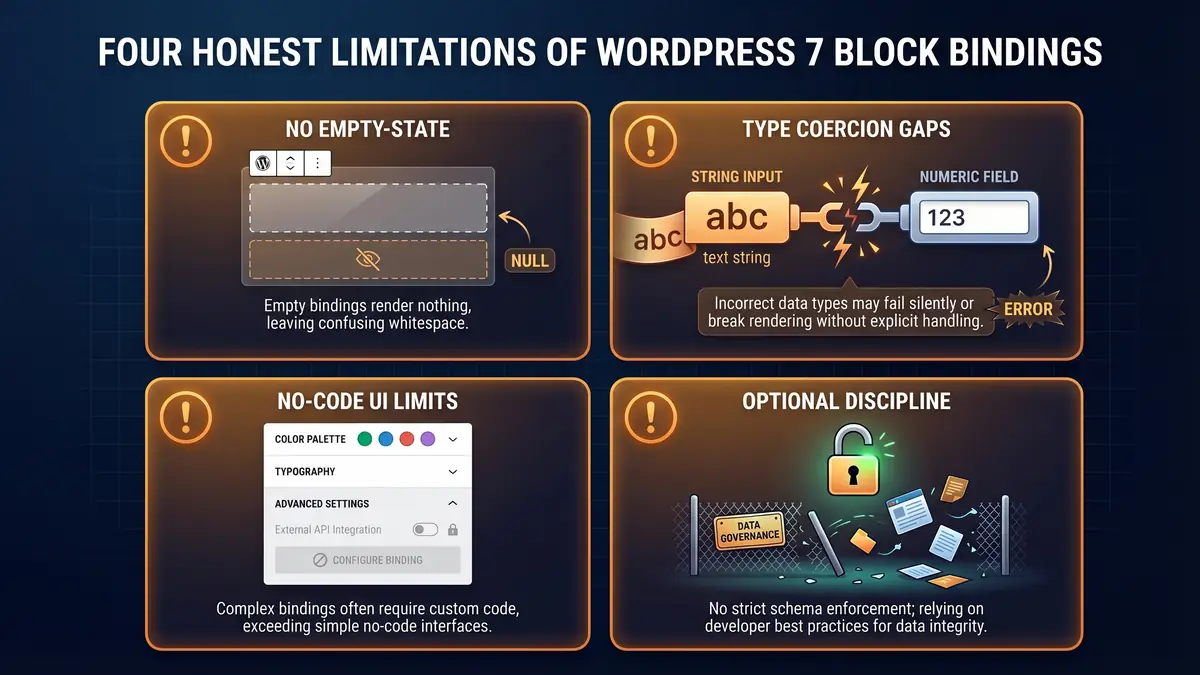
Where It Still Falls Short
Let's not oversell this. Block Bindings, even with the WordPress 7 improvements landing soon, is not the same as a proper enterprise application architecture.
There's no built-in way to hide a block gracefully when its bound data source is empty. If a product has no price, you get the block with no content rather than the block disappearing. There's no clean type coercion, so a string-based meta field doesn't bind cleanly to a numeric attribute without custom casting. External API sources still largely need manual code editor work, because the no-code UI is focused on post meta.
And the whole thing is optional. A site can use it for some blocks, ignore it for others, and nothing in the core platform objects. That's a strength for adoption. It's also a weakness if you were hoping for a clean architectural line. The capability is there. The discipline isn't.
What Site Owners Should Actually Do
If you're commissioning a new build this year, ask your WordPress development agency whether they're designing around Block Bindings. If you already own a site and you've been dreading the next batch of content updates, ask whether fields that change frequently (prices, opening hours, staff details, product specs) can be moved behind bindings. The migration doesn't have to happen all at once.
If you're on a support and maintenance plan, this is exactly the kind of decision your agency should be making on your behalf. The revised WordPress 7 schedule is due from the core team on 22 April, and most estimates point to a mid-to-late May release. That's still time to get your content model sorted before the features go live. We've covered the rest of the pending release too. The AI Connectors and the budget risk in core, and why the launch slipped past the WordCamp Asia deadline. Our sister hosting company has also tested every feature of the AI Experiments plugin in beta, which gives you a practical view of what the platform will do that wasn't possible in WordPress 6.
The quiet architectural shift is the one that ages best. Most headlines don't notice it. But WordPress is becoming a structured CMS, slowly, in the parts of the platform that don't make for a State of the Word moment. The sites built to take advantage will look very different in five years to the sites that weren't. For more on where the platform is heading, our WordPress coverage tracks the broader story release by release.
Frequently Asked Questions
What are Block Bindings in WordPress 7?
Block Bindings let WordPress core blocks (paragraphs, headings, buttons, images, and more) pull their content from structured sources like post meta, custom fields, or site data, rather than holding the content directly inside the block. The block becomes a presentation container. The content lives in a separate data layer.
Are Block Bindings the same as custom fields?
Not quite. Custom fields (post meta) are a storage mechanism. Block Bindings are the connection layer that lets a block read from post meta, or from other sources such as term data, post data, or developer-registered custom sources. Custom fields are the "what". Block Bindings are the "how it reaches the page".
Do I need Block Bindings for my site?
No. Nothing in WordPress core requires you to use them. Small brochure sites with static content often will not benefit much. Sites with repeated data (prices, team members, product specs, event details) or sites that syndicate the same content in multiple places gain the most from adopting them.
How do Block Bindings impact SEO?
Indirectly, but a lot. When your on-page content and your structured data both read from the same bound source, your JSON-LD schema stays in sync with what visitors actually see. Search engines and AI systems reward consistency between visible content and semantic markup, which structured content makes easier to achieve.
Is WordPress becoming a structured CMS?
It is heading that way. Block Bindings, the Abilities API, pattern overrides, and the emerging data source registration all point to a platform where content lives in a proper data layer and blocks consume it. WordPress will not force anyone to build that way, but the pieces are now in place for those who want to.
Do Block Bindings improve performance?
On balance, yes. Bound core blocks use optimised core markup and avoid per-instance render callbacks. Cache layers store structured data more predictably than free-form HTML, and the hosting layer, including edge caching on managed WordPress hosting, handles repetitive structured markup more efficiently than one-off page content.
Thinking About a Properly Designed WordPress Build?
We design sites around structured content from day one. Fewer copy-paste pages, cleaner maintenance, better rankings, and data that's ready for the next decade of AI and search. Talk to us about your next WordPress project.
WordPress Design ServicesPublished: 14 April 2026 · Last reviewed: 14 April 2026 · Written by: Mark McNeece, Founder & Lead Developer, Press Forge
Editorially reviewed by: Mark McNeece on 14 April 2026 · Our editorial standards
Sources
- Block Bindings - Block Editor Handbook (WordPress Developer Resources)
- New Feature: The Block Bindings API - Make WordPress Core (Artemio Morales, 6 March 2024)
- Block Bindings: Improvements to the Editor Experience in 6.7 - Make WordPress Core (Artemio Morales, 21 October 2024)
- Pattern Overrides in WP 7.0: Support for Custom Blocks - Make WordPress Core (16 March 2026)
- The Block Bindings API Brings Dynamic Data to Blocks - WP Tavern (Brian Coords, 1 March 2024)
- WordPress Block Bindings API: Dynamic Content in Custom Blocks - Jon Imms
- Introducing Block Bindings, Part 2: Working with Custom Binding Sources - WordPress Developer Blog
- Windows DNA - Wikipedia
- Using a Three-Tier Architecture Model - Microsoft Learn